Pavan G S as a 3D character, seated at a table and working on a laptop

Pavan G S, Forward Deployed Engineer

I build AI agents and keep IT running.

01 / About

If it annoys me twice, I build a tool.

I build software and LLM tools inside enterprise IT teams, then run them in production. 9+ years in IT, from a 24×7 service desk to sole engineer on two production platforms, so the tools fit how the teams actually work.

I can’t leave a hard problem alone. I started by scripting away my own repetitive IT work. Now I sit with the people who have the problem, work out what is really going on, and build whatever it takes. The best part is still the moment something everyone called impossible just works.

“His positive attitude and optimistic outlook created a motivating atmosphere within the team. Very much skilled with PowerShell scripting, server and infra automation and troubleshooting with permanent fixes.”

Karthik V, on LinkedIn

Press the card to turn it over.

Based
Bengaluru, India
Now
Senior IT Engineer, Alcatel-Lucent Enterprise, via SDC Tech Solutions
Also
Sole engineer, NOC Console and ITSM Tool, SDC Tech Solutions client engagement
In IT since
2017
Email
[email protected]
Open to
Forward deployed and applied AI roles
Homelab
A 3-node Proxmox cluster on ZFS, provisioned with Terraform and Ansible, reached through Cloudflare Tunnel with no open ports.
Automations
A daily news brief and a Gmail organiser on n8n and local Ollama models: about 150 articles and 120 emails a day at $0 API cost.
Reading
Thrillers, mostly. The Silent Patient, The Passengers, A Short Stay in Hell.
Off duty
Ghost of Tsushima and Red Dead Redemption 2 on the PS5. Dandeli, the Western Ghats and Sapa when I can get away.

02 / Skills

What I work with.

Every skill on my resume, grouped by family. Pick one to see which of the projects below use it.

03 / Work

Things I’ve built.

Six pieces of work. Open one to read it.

Client engagement

NOC Console

BeforeSix vendor consoles and days-long SLA reports

Afterone read-only screen, minutes.

The problem

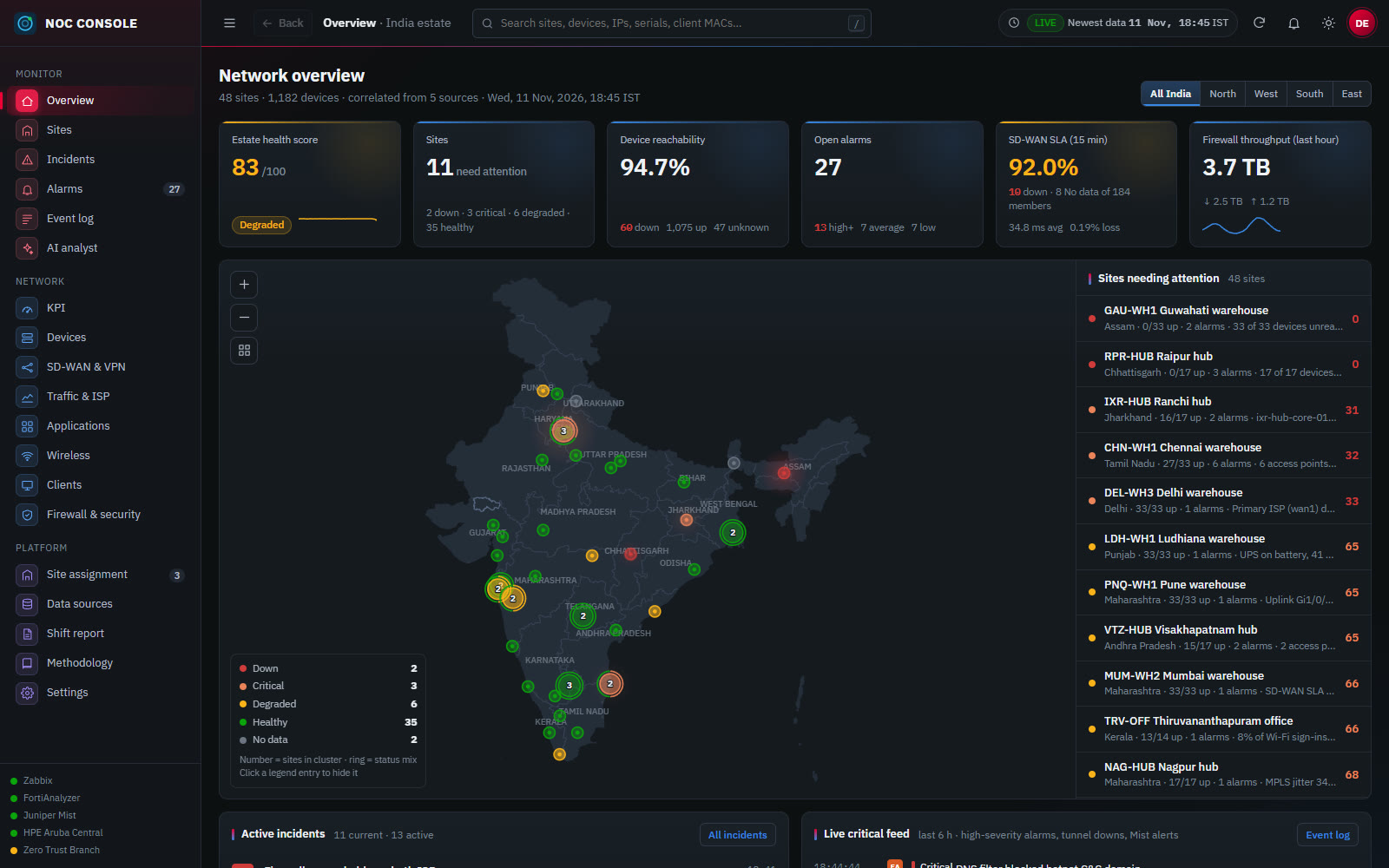
The network team looked after 102 sites and about 3,500 devices across separate tools: a monitoring front end, the vendor consoles and the ITSM tool. The morning health check meant going through six consoles, and the monthly uptime and SLA report took days. The client’s own ticket data showed the cost: a fault raised by monitoring closed in a median 11 minutes, but one raised by a person took 15.9 hours. Too many faults were being found by the users who suffered them.

Why I built it

If the team sees a fault before a user reports it, it gets fixed faster. So I built one read-only screen over every source, where an operator finds the fault and its cause in one place, with no way to change a vendor system by accident. An analyst on Amazon Bedrock answers questions in plain language from the console’s own data, instead of someone checking and adding up across screens.

What I built

  • One console over Zabbix, FortiAnalyzer, Juniper Mist, Aruba Central, Cisco Meraki, Zscaler and ServiceNow.
  • Site health scores, the fault and its cause on one page, uptime, SLA and MTTR figures, and scheduled reports.
  • ServiceNow incidents linked to their site and device.
  • The Bedrock analyst, read-only by design.
  • 4,600 automated tests that replay real vendor responses before every release.

How it fits together

Sources (read-only)ZabbixFortiAnalyzerJuniper MistAruba CentralCisco MerakiZscalerServiceNowCollector(TypeScript,Node.js)SQLiteREST APIConsole (browser):health, KPIs,SLA reportsBedrock analyst(read-only,answers fromconsole data)reads Sources (read-only)ZabbixFortiAnalyzerJuniper MistAruba CentralCisco MerakiZscalerServiceNowCollector(TypeScript, Node.js)SQLiteREST APIConsole (browser):health, KPIs,SLA reportsBedrock analyst(read-only, answersfrom console data)reads
Every source is read-only; nothing writes back to a vendor system.

What changed

  • Six consoles became one screen.
  • The monthly SLA report now arrives in minutes, not days.
  • 55–180 resolution hours a month saved on faults users report, each found 30 minutes to 2 hours earlier (estimate).
  • In production since September 2026, processing about 234,000 Zabbix problems, 17 million events and 750 ServiceNow incidents a month.

My role

Sole engineer, architect and owner, as an SDC Tech Solutions client engagement. I sat with the client’s network and IT teams, chose the stack, designed the architecture and workflows, and wrote the specifications the coding agents built to. Every release was tested end to end on a staging server first.

Tech stack

  • Languages: TypeScript, JavaScript, SQL.
  • Front end: a single-page app in plain JavaScript, D3.js for the site map and charts.
  • Back end: Node.js, a REST API, SQLite.
  • AI: Amazon Bedrock, read-only, answering from the console’s own data.
  • Integrations (read-only): Zabbix, FortiAnalyzer, Juniper Mist, Aruba Central, Cisco Meraki, Zscaler, ServiceNow.
  • Security and delivery: Argon2id, AES-256 secrets, an OWASP ASVS review, Ed25519-signed updates with automatic rollback, an AWS EC2 staging server, 4,600 automated tests.

Client engagement

ITSM Tool

BeforeChanges and WAN requests in email chains

Afterone governed platform, offline.

The problem

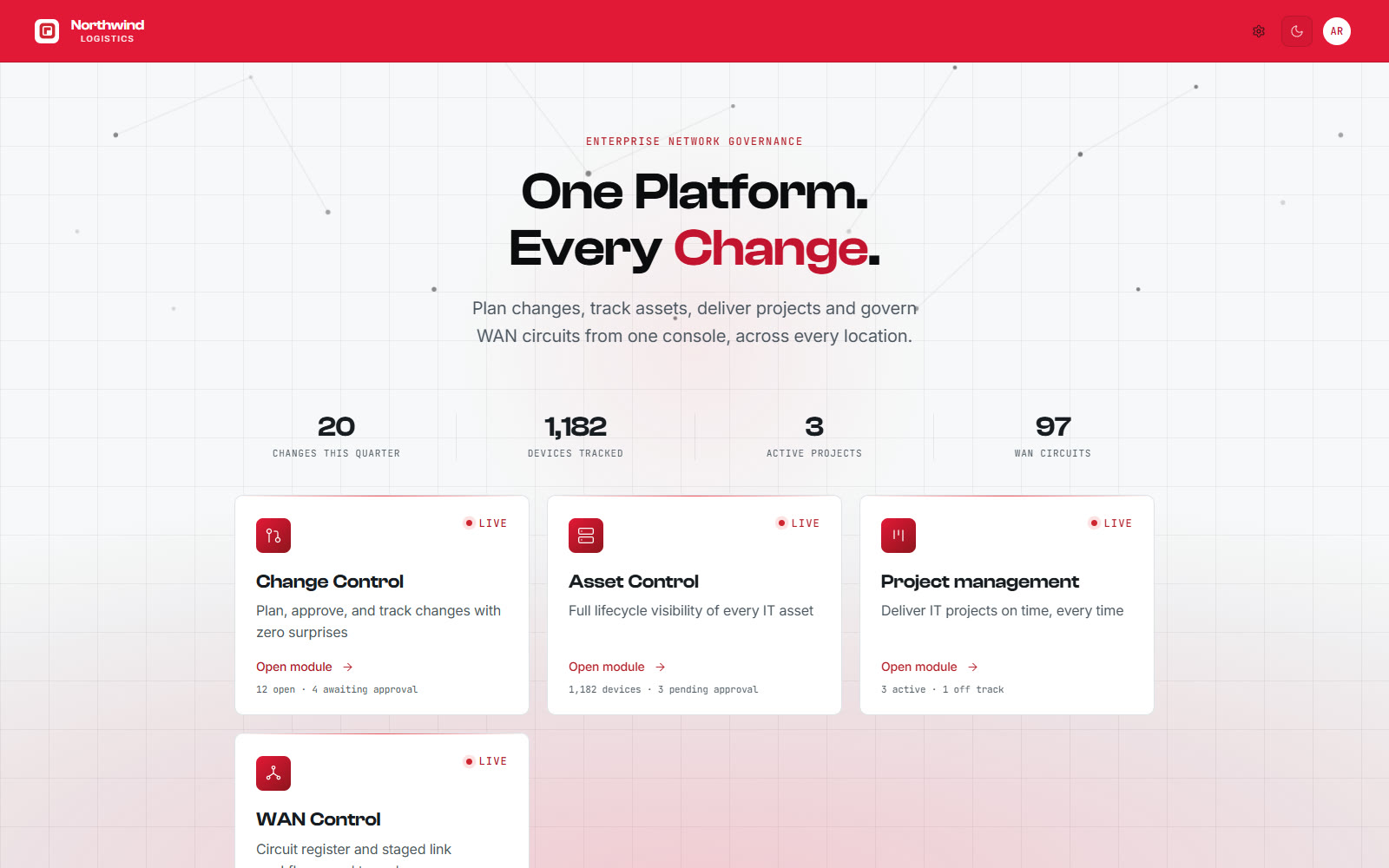
About 50 network staff ran changes, assets and WAN links. WAN link requests came in by email, ISP feasibility checks went out with a five-working-day reply window, and every step was tracked through email chains. The circuit register was a spreadsheet of 383 rows. Whether two changes clashed on the same device, or work landed in a freeze, depended on someone noticing.

Why I built it

Changes, assets, circuits and projects each needed a process people could trust, with approvals on record. The server is air-gapped, with no internet, so the platform had to install and update itself offline and recover on its own if an update failed. Approvals straight from email let approvers act without opening the tool, so governance doesn’t slow the change down.

What I built

  • ITIL change control with six roles, CAB approvals, one-time approval links by email, per-device conflict detection, freeze windows, reminders and escalation.
  • Asset and circuit registers with spreadsheet import.
  • WAN link requests with ISP feasibility timers and a shared mailbox feeding requests in.
  • Active Directory sign-in, login lockout, encrypted secrets and an append-only audit trail.
  • A one-file offline installer, and verified updates that back up first and roll back on a failed health check.

How it fits together

Air-gapped RHEL serverUsers(browser)Approvers(email links)Next.js app on Node.jsSQLite(Drizzle ORM)Active Directory /LDAP(sign-in)Shared mailboxCSV / XLSX importWAN requestsOffline installer · checked updates · auto rollback Users (browser)Approvers (email links)Active Directory / LDAP (sign-in)Shared mailboxWAN requestsCSV / XLSX importAir-gapped RHEL serverNext.js app on Node.jsSQLite (Drizzle ORM)Offline installer ·checked updates · auto rollback
Runs with no internet: installs, updates and rolls back on its own.

What changed

  • Changes, assets and WAN requests run through one platform and one sign-in instead of email chains.
  • Every change is checked against other work on the same device and against freeze windows before it is approved.
  • The client’s written feedback became shipped releases within days.

My role

Sole engineer, architect and owner, as an SDC Tech Solutions client engagement. I sat with the client’s network and IT teams, chose the stack, designed the workflows and wrote the specifications the coding agents built to.

Tech stack

  • Languages: TypeScript, SQL.
  • Front end: Next.js and React.
  • Back end: Next.js on Node.js, SQLite with Drizzle ORM.
  • Integrations: Active Directory / LDAP sign-in, email approvals and a shared mailbox, CSV and XLSX import.
  • Security and delivery: Argon2id, encrypted secrets, an append-only audit trail, an air-gapped RHEL server, a one-file offline installer, SHA-256-checked updates with automatic rollback, Vitest.

Open source

WinForge

Before3–4 weeks of hand-built golden images

After3–4 days, offline.

The problem

A golden Windows image meant installing Windows on a laptop, setting everything up by hand, then Sysprep and capture. One forgotten step meant starting again from scratch. The whole cycle took 3–4 weeks, and it repeated for every new Windows release, driver set or app change.

Why I built it

WinForge works offline, straight on the Windows image, so there is no golden machine to build and no Sysprep step. A validator inspects the image before anything is committed and stops with a report, so a bad image never ships. A saved profile rebuilds the same ISO on any machine, so the build no longer depends on one person remembering every step.

What I built

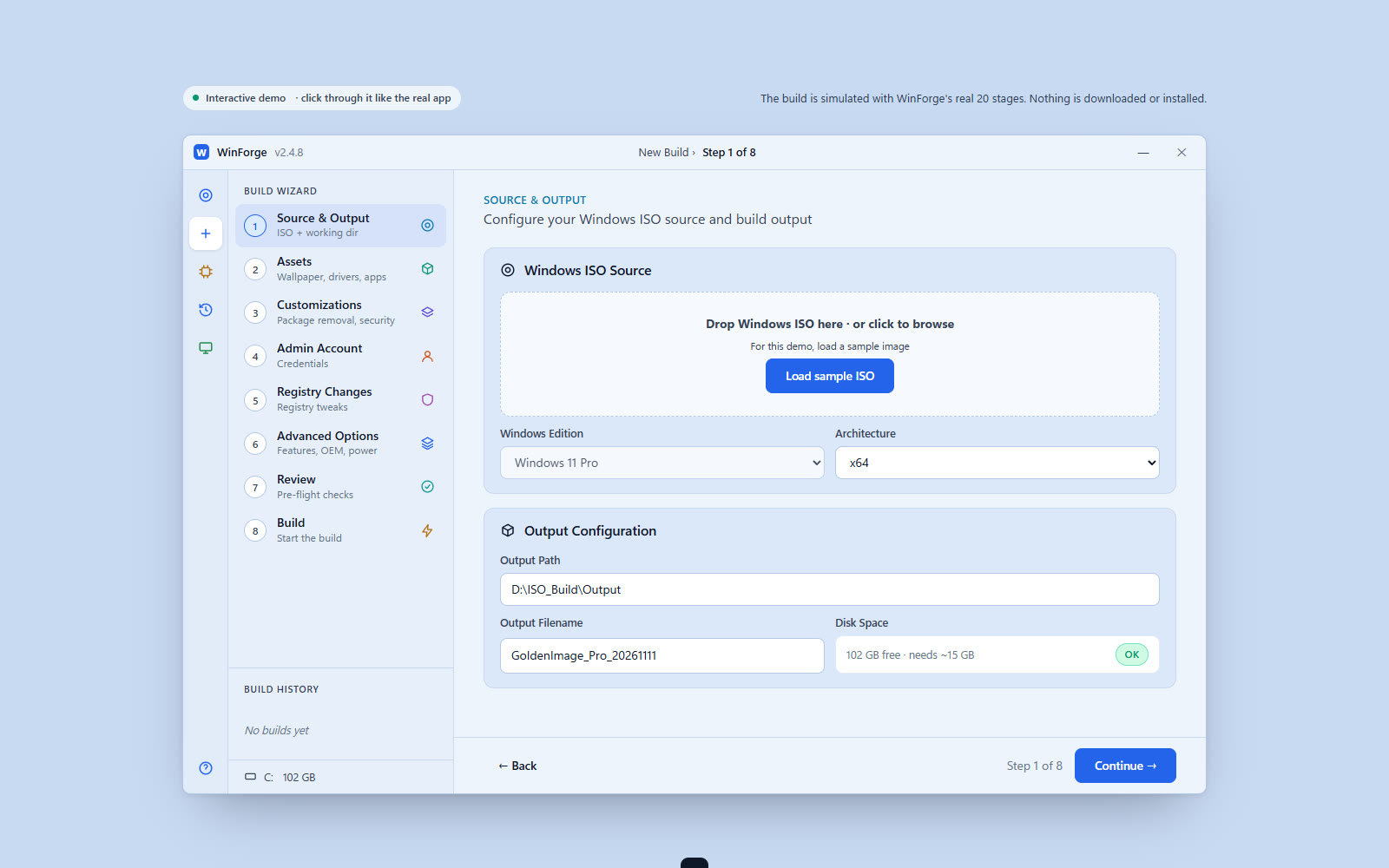
  • A Windows 11 image builder in C# and .NET 8: 22,000+ lines, an 8-step wizard and a 19-stage offline pipeline.
  • Offline registry and Group Policy changes, and driver downloads for Dell, HP and Lenovo.
  • A validator with 104 checks.
  • A Hyper-V test boot to try the image before deployment.
  • Open source under the MIT licence.

How it fits together

Windows ISO +saved profile8-step wizard(WPF, .NET 8)Offline image edits: registry,Group Policy, drivers (Dell / HP /Lenovo), apps104-check validatorDISM commit → ISOHyper-V test bootfail → report, nothingcommitted Windows ISO + savedprofile8-step wizard(WPF, .NET 8)Offline image edits:registry, Group Policy,drivers (Dell / HP /Lenovo), apps104-check validatorDISM commit → ISOHyper-V test bootfail → report,nothingcommitted
A bad image is stopped before it is committed.

What changed

  • Golden-image work went from 3–4 weeks to 3–4 days.
  • A mistake now means rerunning the build, not starting over by hand.

My role

I designed, built and open-sourced it while Senior IT Engineer at Alcatel-Lucent Enterprise, via SDC Tech Solutions.

Tech stack

  • Languages: C#, XAML, PowerShell.
  • Desktop app: WPF on .NET 8, shipped as a single self-contained exe with an Inno Setup installer.
  • Imaging: DISM, offline registry and Group Policy edits, Dell / HP / Lenovo driver fetch, a 104-check validator.
  • Testing: a Hyper-V test boot of every image.
  • Open source under the MIT licence.

Alcatel-Lucent Enterprise

Service desk AI

BeforeVague tickets and remote sessions for repeat fixes

Aftercomplete tickets and scripted fixes.

The problem

At a 2,500-person site, users logged vague tickets or sent emails, and engineers spent their time on the same repetitive fixes. Engineers went back to users for missing details before they could start. Every log check meant a remote session, so a diagnosis waited until the engineer and the user were both free.

Why I built it

Two tools, one goal: give engineers their time back. The chatbot answers from the desk’s own knowledge articles and past resolutions, and a light first layer filters small talk so only real requests reach the model. The IT Analyst keeps the engineer in control: it suggests a root cause with a confidence score, and the engineer decides the fix.

What I built

  • An IT support chatbot in Python on Amazon Bedrock, with retrieval over knowledge articles and past resolutions. It asks clarifying questions, gives the steps when the knowledge base covers the problem, and otherwise raises a complete ticket.
  • The IT Analyst: a diagnostics agent on Amazon Bedrock over resolved tickets and structured Windows telemetry, behind a certificate-secured channel with scheduled health checks and on-demand log collection.
  • Engineer-controlled fixes: the engineer ships the fix as a script and opens a remote session only when it matters.

How it fits together

IT support chatbotUserSmall-talkfilterAmazon Bedrock + RAG(knowledge articles, pastresolutions)Steps from theknowledge baseComplete ticket toengineersIT AnalystWindowsendpointsCertificate-secured HTTPS(health checks, logs)Amazon Bedrock + RAG(resolved tickets,telemetry)Root cause + confidenceEngineer decides → fix as a script IT support chatbotUserSmall-talk filterAmazon Bedrock + RAG(knowledge articles, past resolutions)Steps from theknowledge baseComplete ticket toengineersIT AnalystWindows endpointsCertificate-secured HTTPS(health checks, logs)Amazon Bedrock + RAG(resolved tickets, telemetry)Root cause + confidenceEngineer decides → fix as a script
The engineer stays in control of every fix.

What changed

  • About 350 requests a month resolved without an engineer, 40% of the chatbot’s traffic (estimate).
  • 90–115 engineer-hours a month returned to the desk (estimate).
  • The rest reach engineers as complete tickets.
  • 10–20 engineer-minutes saved per diagnosis (estimate), and routine diagnoses no longer need a remote session.

My role

I built both tools while Senior IT Engineer at Alcatel-Lucent Enterprise, via SDC Tech Solutions, working inside the site’s IT team.

Tech stack

  • IT support chatbot: Python, Amazon Bedrock, retrieval (RAG) over knowledge articles and past resolutions, a first layer that filters small talk.
  • IT Analyst: an LLM agent on Amazon Bedrock with RAG over resolved tickets and structured Windows telemetry, a certificate-secured HTTPS client-server, scheduled health checks and on-demand log collection.

Personal project

MoneyMate

BeforeA household spreadsheet

Afteralerts and statements reconciled, with an AI review.

The problem

Our money runs across a joint account and two personal ones. Bank alerts came in on two phones, and statements came as password-locked PDFs. I tracked it all in a spreadsheet. Moves between our own accounts looked like spending, cash withdrawals disappeared from view, and nothing showed whether we were on track to save.

Why I built it

The apps I tried couldn’t split each salary into bills, spending and savings the way we wanted, or tell us what we could do better, the way a personal chartered accountant would. They also didn’t fit how we work: a joint account plus two personal ones, one shared login, and months that run from payday to payday. I wanted it private, too: only the two of us can sign in, and the AI never sees account numbers.

What I built

  • Bank alerts arrive on their own from both phones, and emailed statements are picked up every day.
  • Every statement row is checked against the running balance, and only the payments the alerts missed are added.
  • Transfers, refunds and paybacks are paired before anything is categorised. Then rules, known bills and an AI guess sort the rest, with a review queue for anything unsure.
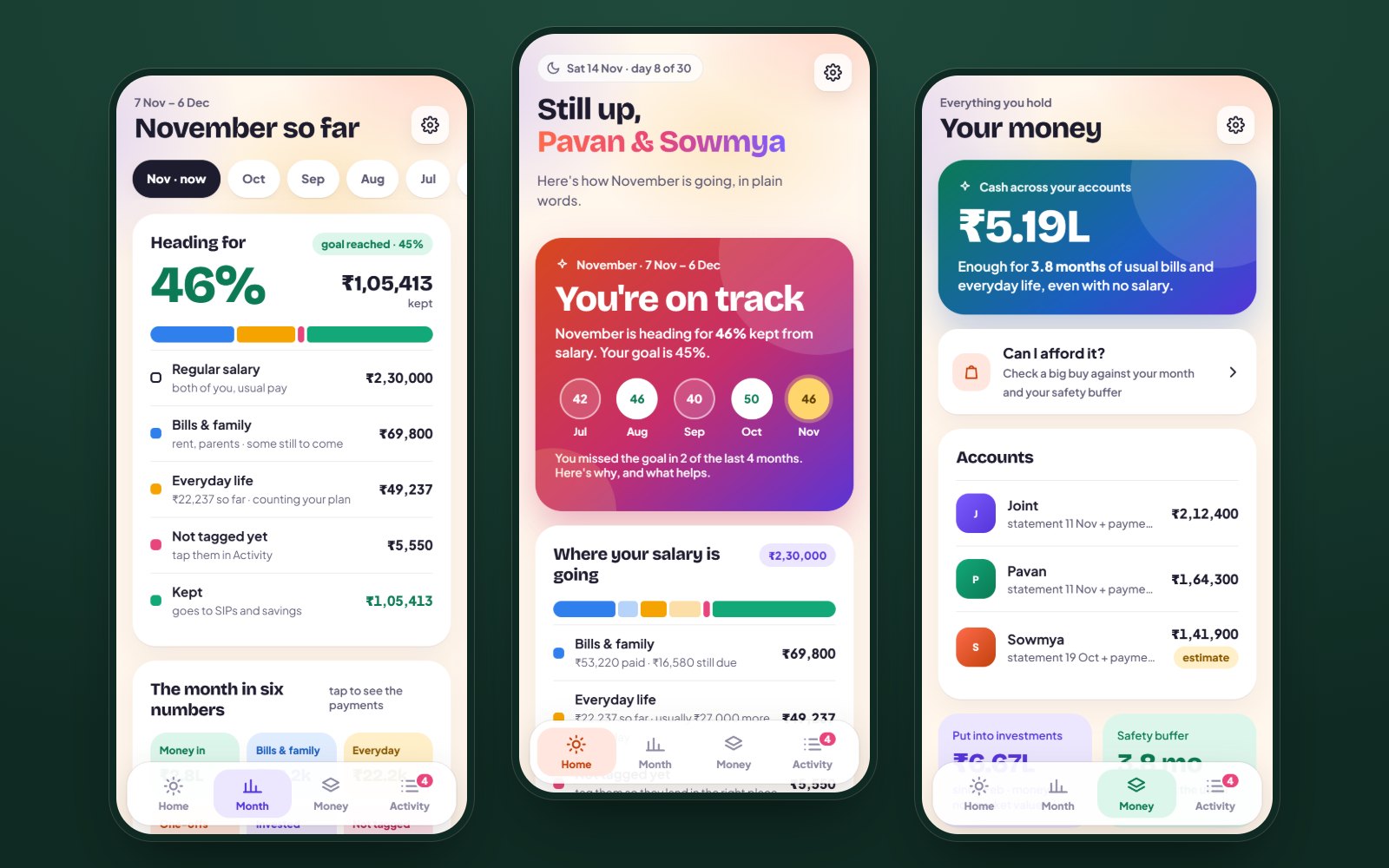
  • A pay-cycle view, a month-end report with an AI review, “Can I afford it?”, and plain-English questions where the app does the arithmetic, not the AI.
  • Installs on iPhone from Safari, with push alerts for budgets, renewals, low balances and possible double charges.
  • The hard parts it handles: SMS that bundle several alerts, a different PDF layout per bank, the same payment arriving twice in different words, and months that run payday to payday.

How it fits together

InputsBank SMS(iPhone Shortcut)Alert emails(Cloudflare EmailWorker)Statement PDFs(Gmail Apps Script)Next.js on VercelParseMatch accountSkip duplicatesPair transfers & refundsCategorise (rules, then AI)Supabase(Postgres, RLS)Pay-cycle viewMonth report +AI reviewAskCan I afford it?Push alertsThe AI never sees account numbersand never does the arithmetic. InputsBank SMS(iPhone Shortcut)Alert emails(Cloudflare Email Worker)Statement PDFs(Gmail Apps Script)Next.js on VercelParseMatch accountSkip duplicatesPair transfers & refundsCategorise (rules, then AI)The AI never seesaccount numbers andnever does thearithmetic.Supabase (Postgres, RLS)Pay-cycle viewMonth report + AI reviewAskCan I afford it?Push alerts
Transfers and refunds are paired before anything is categorised.

What changed

  • About 130 payments a month are read and reconciled with no manual entry.
  • Transfers between our own accounts no longer count as spending, and duplicate charges show up.
  • One pay-cycle view shows money in, spending, investing and cash against a savings target.
  • In daily use since June 2026, with 670 automated tests, on free hosting.

My role

Everything: product, design, code and running it. I built it for our own household and use it every day.

Tech stack

  • Languages: TypeScript, SQL, Google Apps Script.
  • Front end: Next.js 16 and React 19, Tailwind CSS 4, Recharts, Motion, installable on iPhone as a web app.
  • Back end: Next.js route handlers and server actions on Node.js, Zod, PDF statement parsing, Web Push.
  • Data: Supabase (Postgres, Auth, Storage) with row-level security, AES-256-GCM for statement passwords.
  • AI: a provider-agnostic LLM layer (Anthropic or any OpenAI-compatible API), set in configuration.
  • Hosting and delivery: Vercel with a daily job, a Cloudflare Email Worker, a Gmail Apps Script, Vitest.

Personal project

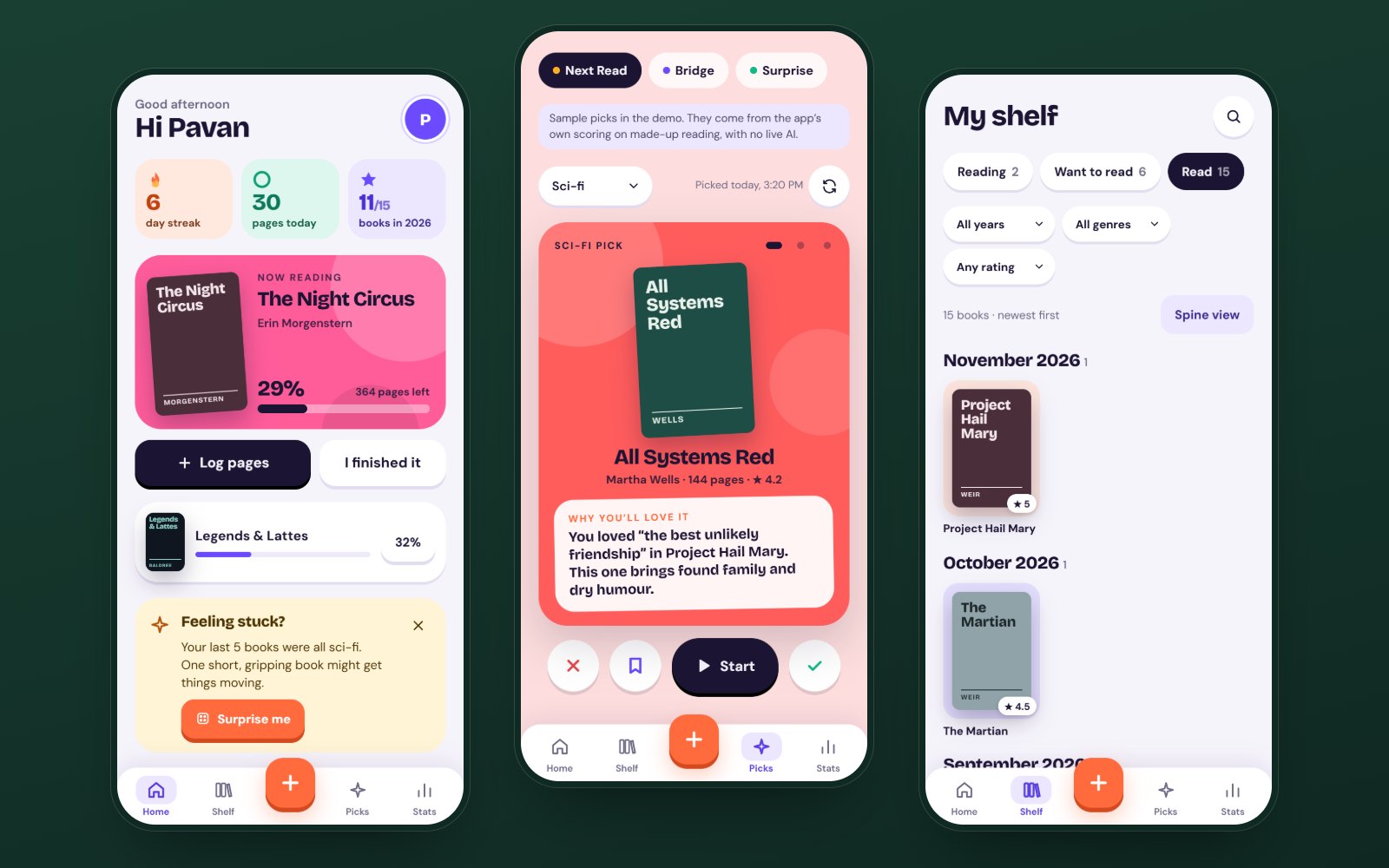
Night Stand

BeforeBook picks by genre and popularity

Afterpicks from why you loved a book.

The problem

Two readers at home kept track of what they read and wanted to read in scattered places. Recommendations from book sites came from genre and popularity, not from why we liked a book: the twist, the narrator you can’t trust, the found family. Finding the next read meant scrolling lists that didn’t know us.

Why I built it

I wanted picks that start from what each of us loved about our top-rated books. So every book carries traits, and the app builds a profile from the ones you rated highest. It is mobile-first and installs on a phone, because that’s where we decide what to read next. Everything runs on free tiers except the AI.

What I built

  • Shelves for read, reading and want to read, with page progress, ratings, notes and a yearly goal for each reader.
  • Reading stats for each reader.
  • Recommendations from a profile of the traits in your top-rated books, explained in plain words, with an AI pick through OpenRouter and a local fallback that needs no AI.
  • Book search across Google Books, Hardcover and Open Library, and real covers checked for size and shape, resized and stored once.
  • A built-in catalogue of 56 books with their traits, so picks work from day one.
  • An installable app that keeps working offline.

How it fits together

Phone app(React, Vite,offline)Supabase:Auth, Postgres (RLS),StorageEdge Functions on Deno:search · book · covers ·traits · recommendShared TypeScript coreGoogle Books ·Hardcover · Open Library(book data and covers)OpenRouter (AI pick)Local picks from your traitsfallback Supabase:Auth, Postgres (RLS),StoragePhone app(React, Vite, offline)SharedTypeScriptcoreEdge Functions on Deno:search · book · covers · traits · recommendGoogle Books ·Hardcover ·Open Library(book data and covers)OpenRouter(AI pick)Local picks from your traitsfallback
Picks start from the traits of the books you rated highest.

What changed

  • Our shelves, reading and goals live in one place on our phones.
  • The next read comes with a reason: the traits it shares with books we loved.
  • It runs on free tiers; the only paid service is the AI.

My role

Everything: product, design, code and running it. I built it for our own reading at home.

Tech stack

  • Languages: TypeScript, SQL.
  • Front end: React 18 and Vite, installable and works offline (service worker).
  • Back end: Supabase Edge Functions on Deno, sharing one TypeScript core with the app.
  • Data: Supabase (Postgres, Auth, Storage) with row-level security.
  • AI: book picks through OpenRouter (DeepSeek), with a local fallback that needs no AI.
  • Book data: Google Books, Hardcover and Open Library.
  • Hosting: Cloudflare Pages, kept awake by a Cloudflare Worker and a GitHub Actions job.

04 / Live demos

Use them yourself.

These are the real front ends on invented data: a made-up company, Northwind Logistics, for the work tools, and made-up payments and reading logs for MoneyMate and Night Stand. Click around.

NOC Console overview screen

Built for a client organisation, which owns the platform. Shown with permission, using demo data. Open it in a new tab

05 / Experience

Where I’ve worked.

9+ years, four workplaces, one habit: I end up building the tool the team was missing.

  1. IT Service Desk Engineer

    Samsung India, Bengaluru

    Three and a half years on a 24×7 desk, where an SLA clock ran on every ticket. It is where I learned what breaks, and what the person on the other end of a ticket needs.

    • 24×7 coverage
    • Windows and Linux
    • RBS / SVPN services
    • Kept RBS and SVPN services running around the clock, to SLA, for the people who depended on them.
    • Fixed what users and machines threw at the desk: Windows 7 and 10, hardware, and Linux on Ubuntu, RHEL and CentOS.
    • Built and rebuilt machines through OS deployment, antivirus and video-conferencing setup.
    • Looked after the data centre and servers behind the services.
    • Moved support and onboarding fully remote when lockdown closed the office.

    COVID Warrior Award, Samsung India, for 24×7 remote support and virtual onboarding during lockdown.

  2. Cloud and Infrastructure Engineer

    QualiTest Group, Bengaluru

    I ran the infrastructure a global testing company worked on, and wrote the software its IT team ran on.

    • 14 office locations
    • 99.5% server uptime
    • 13 tools shipped
    • Halved server build time by standing up Proxmox virtualisation with VM builds in Terraform and Ansible, alongside the global VMware ESXi, VDI and Citrix XenApp estate.
    • Wrote 13 tools that turned multi-step admin work into one window: account creation, password resets, credential storage, remote reboots and silent Windows 11 upgrades.
    • Replaced manual OS installs with WDS and MDT automation, Sysprep golden images, MSIX packages and Desktop Central distribution.
    • Gave people self-service installs of the 25–30 applications they used every day, through an App Store I built on SharePoint.
    • Centralised Active Directory and Group Policy across every office, and owned DNS, DHCP, IPAM and SFTP, including the on-site server migration for the Noida office.
    • Cut onboarding time by 30% and saved about 20 hours a week with Power Automate and SharePoint workflows.
    • Kept 99.5% server uptime for the year through backups, load balancing and acting on issues the moment they appeared.

    IT Super Star Award, Q3 2022, QualiTest Global IT.

  3. Senior IT Engineer

    Alcatel-Lucent Enterprise, Bengaluru, via SDC Tech Solutions

    Embedded in the IT team of a 2,500-person site. I ran the estate, then built the tools that removed its repeat work.

    • ~2,500 people on site
    • ~2,000 endpoints
    • ~100 changes a month
    • Run change management as change manager through the CAB for about 100 changes a month, checking each for clashes, business impact and timing. I have stopped changes with missing approvals, changes filed inside a freeze, and one that would have failed a critical change running at the same time.
    • Built AI into the service desk: an IT support chatbot on Amazon Bedrock with RAG over knowledge articles and past resolutions, and IT Analyst, which collects a machine’s logs so the engineer can fix it without a remote session.
    • Cut golden-image builds from weeks to days with WinForge, a Windows 11 image builder that checks the image before it is committed. Now open source.
    • Patch and deploy software to about 2,000 Windows endpoints through Endpoint Central, and ship my own fleet fixes through it as silent, repeatable installers.
    • Lead the MDM rollout for 2,000 BYOD devices, designed so Office 365 on mobile works only on enrolled phones, through certificate-based access in Entra, with a staged runbook and six named incident risks.
  4. ITSM Tool from , NOC Console from

    Sole engineer, NOC Console and ITSM Tool

    SDC Tech Solutions, client engagement

    Architect, builder and owner of two production platforms for a client’s network and IT teams.

    • 102 sites
    • ~3,500 devices
    • 34 tagged releases
    • Replaced six vendor consoles with one screen: the NOC Console reads seven sources, never writes to any of them, and shows the cause of a fault on one page.
    • Shipped 34 tagged releases in three months across both platforms, 1,657 commits, as the only engineer.
    • Delivered to an air-gapped server: an offline installer, and updates that check themselves, back up and roll back automatically if the health check fails.
    • Sat with the people who use them, turned written client feedback into releases within days, and wrote the records the coding agents built to.
    • Tested every release end to end on an AWS EC2 staging server before production, behind gates that replay real recorded vendor responses.
  5. Next: your team?

    Open to forward deployed and applied AI roles.

    Get in touch

Everything I’ve built

22 tools, from PowerShell admin tools to AI agents. Some are on GitHub; the rest were built for the teams I worked in.

  • QReset

    2023

    What it doesResets Active Directory passwords for first-line admins. Unlock lights up only when the account is locked, and Enable only when it is disabled.

    What it replacedOpening AD Users and Computers and hunting for the right checkbox on every call.

    • PowerShell
    • WinForms
    • Active Directory
  • ADWiz

    2023

    What it doesCreates an Active Directory user in one form: location sets the country, office and attributes for 14 offices; it checks for duplicates, sets mail and adds the groups.

    What it replacedHand-typing every attribute for each new joiner.

    • PowerShell
    • WPF
    • Active Directory
  • QPass

    2023

    What it doesAn in-house random password generator for the IT team.

    What it replacedPasswords copied from online generators.

    • PowerShell
  • KeyGuardian

    v1.0.0, 2023

    What it doesA password-sharing app: sends a password as an expiring, view-limited one-time link, and can generate a strong one first.

    What it replacedSending passwords in plain text.

    • PowerShell
    • WPF
    • Password Pusher API
  • Password Vault

    v1.2.0, 2023

    What it doesA desktop credential store; each record is AES-256 encrypted under a master password, with search and CSV import.

    What it replacedA spreadsheet of passwords.

    • PowerShell
    • WPF
    • .NET cryptography
  • App Store

    2022–23

    What it doesSelf-service installs of the 25–30 applications people used every day, through SharePoint.

    What it replacedA ticket and a wait for every install.

    • PowerShell
    • SharePoint
  • Windows 11 Upgrader

    2023

    What it doesDownloads Windows 11 and runs a silent in-place upgrade as a SYSTEM task through the endpoint agent, with a log per machine.

    What it replacedUpgrading machines one desk at a time.

    • PowerShell
    • WinForms
    • Desktop Central
  • Reboot Tool

    v1.0, 2023

    What it doesPing, continuous ping, OS check, RDP and remote reboot in one window, with credentials held for the session only.

    What it replacedFour separate windows for one restart.

    • PowerShell
    • WPF
  • AD offboarding tool

    2023

    What it doesRuns the Active Directory offboarding steps from one window.

    What it replacedA checklist worked by hand.

    • PowerShell
    • Active Directory
  • AD host mover

    2023

    What it doesRuns every five minutes and files new computers into the right OU by their name; VDI machines are left alone.

    What it replacedMoving computer objects by hand.

    • PowerShell
    • Active Directory
  • Hostname Change

    2022–23

    What it doesRenames a machine from a small GUI.

    What it replacedRenaming through System Properties on each machine.

    • PowerShell
  • BitLocker script

    2022–23

    What it doesScripted the BitLocker rollout, alongside the BitLocker server I stood up.

    What it replacedEnabling encryption machine by machine.

    • PowerShell
    • BitLocker
  • Compare Excel

    2022–23

    What it doesCompares two spreadsheets and shows what changed.

    What it replacedComparing sheets by eye.

    • PowerShell
  • IT support chatbot

    2025

    What it doesIt asks clarifying questions, resolves what the knowledge base covers and otherwise raises a complete ticket.

    See the case study

    • Python
    • Amazon Bedrock
    • RAG
  • IT Analyst

    2025

    What it doesIt returns a confidence-scored root cause and the engineer ships the fix as a script, so routine diagnoses no longer need a remote session.

    See the case study

    • Amazon Bedrock
    • RAG
    • PowerShell
  • ClipboardFluent

    2026

    What it doesA 64 KB Win+V clipboard replacement with encrypted pins, pushed to the fleet through Endpoint Central as a silent, repeatable installer.

    What it replacedWindows’ own Win+V history.

    • C#
    • WPF
    • Endpoint Central
  • Service-account audit

    2025

    What it doesReports which service accounts should be disabled, as CSV and Excel.

    What it replacedReviewing service accounts by hand.

    • PowerShell
    • Active Directory
  • NOC Console

    2026

    What it doesSix vendor consoles and days-long SLA reports one read-only screen, minutes.

    See the case study

    • Amazon Bedrock
    • TypeScript
    • Node.js
    • SQLite
    • D3.js
    • 7 vendor APIs
  • ITSM Tool

    2026

    What it doesChanges and WAN requests in email chains one governed platform, offline.

    See the case study

    • Next.js
    • React
    • TypeScript
    • SQLite
    • Drizzle ORM
    • AD / LDAP
    • RHEL
  • MoneyMate

    2026

    What it doesA household spreadsheet alerts and statements reconciled, with an AI review.

    See the case study

    • Next.js 16
    • React 19
    • TypeScript
    • Supabase
    • Tailwind CSS
    • Vercel
  • Night Stand

    2026

    What it doesBook picks by genre and popularity picks from why you loved a book.

    See the case study

    • React 18
    • TypeScript
    • Vite
    • Supabase
    • Deno Edge Functions
    • OpenRouter

How I work

  1. Anyone can read the ticket. I go and watch the work.

    What people ask for is their best guess at a fix. The real problem shows up when I sit with them: the spreadsheet on the second monitor, the step everyone skips, the workaround nobody admits to. Finding that is the part I’m good at.

  2. Guessing is fast. Being right takes a page.

    Before I build, I write down what I know, what I don’t, and why every decision went the way it did. An honest unknown costs a question. A confident guess costs a rollback. I’d rather ask the question.

  3. AI made typing cheap. Judgment is still expensive.

    Anyone can generate code now. Knowing what to build, what to leave out and where it will break took me nine years to learn, in server rooms and on service desks. That judgment is what I bring. AI only helps me deliver it faster.

  4. Confidence is free. Proof takes work.

    I treat everything as broken until it proves otherwise, starting with my own work. So I build the proof into every release. If a check fails, it doesn’t ship, however sure I am.

  5. Launching is the easy part. I stay for the hard part.

    Software is done when the people using it stop needing workarounds. So I stay. I watch what they do with it, fix what annoys them, and ship the next version before they have to ask.

06 / Achievements

By the numbers.

Every figure here is on my resume.

  1. 102

    sites on one console

    NOC Console

  2. ~3,500

    network devices

    NOC Console

  3. 6

    vendor consoles replaced by one screen

    NOC Console

  4. ~234,000

    Zabbix problems processed a month

    NOC Console, in production

  5. ~17 million

    events processed a month

    NOC Console, in production

  6. ~100

    changes a month through my go / no-go decision

    Change manager and CAB lead, Alcatel-Lucent Enterprise

  7. ~2,000

    Windows endpoints patched and deployed to

    ManageEngine Endpoint Central, Alcatel-Lucent Enterprise

  8. 3–4 days

    for golden-image work, down from 3–4 weeks

    WinForge

  9. IT Super Star Award

    Q3 2022

    QualiTest Global IT

  10. COVID Warrior Award

    for 24×7 remote support and virtual onboarding during lockdown

    Samsung India

07 / Training

Certifications and training.

  1. 01 Certified in Automating Administration with Windows PowerShell Apponix 2021
  2. 02 Microsoft Certified Solutions Associate (MCSA) Rooman Technologies 2017
  3. 03 Cisco Certified Network Associate (CCNA) Rooman Technologies 2017
  4. 04 A+ (Hardware) and N+ (Networking) Rooman Technologies 2017
  5. 05 Advanced Linux: The Linux Kernel LinkedIn Learning 2020
  6. 06 Python Essential Training LinkedIn Learning 2020

08 / Contact

Get in touch.

Hiring a forward deployed engineer, or sitting on an IT problem nobody wants? Write to me.

Bengaluru, India. Open to forward deployed and applied AI roles.

PDF, 2 pages, A4

Resume

Click a page to zoom it